Welcome to grc’s documentation!
Generic Colorizer
Note
Inspired by http://kassiopeia.juls.savba.sk/~garabik/software/grc.html
grc allows you to colorize (even transform) shell output.
WARNING - Pending Project Rename
In order to make roon on pypi for the original grc project, this project
will be renamed to strec soon. The new name was chosen to be very different
from grc to show that it’s a different project. While both do the same,
they do it in a very different manner, and more importantly, the config format
is different.
Alternatives
The original grc
Available at http://kassiopeia.juls.savba.sk/~garabik/software/grc.html
While the original grc is a bit smarter with subprocesses, this rewrite
focuses on ease of use (including Installation, Configuration and
source-code access).
Installation should also honour the Linux FHS
sed or awk
sed and awk are extremely powerful tools, and can certainly do what
grc does. They will certainly perform better on large streams. It’s their
intended use afterall. However, they both use an archaic and arcane syntax
for their scripts. Additionally, if you would like to colorize your output
with these, you need to work with ANSI escape sequences. grc aims to
simplify this by having a more readable Configuration syntax, and by hiding
the ANSI escape sequences.
See the installation document for more information.
Usage
Read lines from stdin and emit modified/colorized lines on stdout
Note
This is the best supported mode of operation.
Synopsis
<some_process> | grc -c <config>
Example
tail -f /var/log/apache2/access.log | grc -c apache_access
- Advantages
- Only the stream you are sending to
grcis affected. - No known side-effects
- Only the stream you are sending to
- Disadvantages
- As
grconly sees a stream, it cannot determine what application is emitting the stream. You have to specify the config manually.
- As
Spawn a subprocess, capture it’s output
Note
Use this if you don’t care about the downsides, and are lazy to type.
Synopsis
grc <some_procss>
Example
grc aptitude search python
- Advantages
- Much less to type
- Can auto-detect the config by using the sub-process application name.
- Disadvantages
- Spawning a subprocess and interacting with it’s IO is non-trivial on a
TTY/PTY. To simplify the code,
grcusespexpectto do the IO magic. stdoutandstderrof the subprocess are combined into one stream, which is then emitten on grc’sstdout. [1]- The output may not use all of the available terminal width. [1]
- Spawning a subprocess and interacting with it’s IO is non-trivial on a
TTY/PTY. To simplify the code,
Configuration
grc searches three locations for configuration files in order:
~/.grc/conf.d/<confname>.yml/etc/grc/conf.d/<confname>.yml/usr/share/grc/conf.d/<confname>.yml
The first matching config file wins. This means, you can override any system-wide configs with your own concoctions.
Syntax
grc uses YAML as config syntax. Comparing to .ini and json files
(both included in the Python stdlib), this syntax lends itself much better to
the requirements of this application.
Basic structure
- The config file is separated into sections (contexts). It has to have at least
the
rootcontext. - Each context has a list of rules. These rules fire if a line contains a given regular expresssion. The first matching rule wins.
- The line will then be replaced with the string contained in the
replacevalue. You can use back-refs if you used capture groups in your regular expressions. Colours can be insterted using${t.color_name}. You should always insert a${t.normal}after using a color, to reset to the terminal default. The colors are provided by the package blessings. Thetvariable is a reference to ablessingsterminal instance so you should be able to use it as it is documented on theblessingshomepage. - Rules may define, that processing should not stop using the
continue:
yes
flag. In that case, the same line will be matched with the following rule as well. - Additionally, rules may “push” another context onto the stack. If that’s the
case, the rule will be processed, and all following lines will be matched
against rules contained in the context named by the
pushvalue. - If in a non-root context, a rule may “pop” the current context from the
stack using the
pop: yesaction.
See Config Reference for more details.
Annotated Example
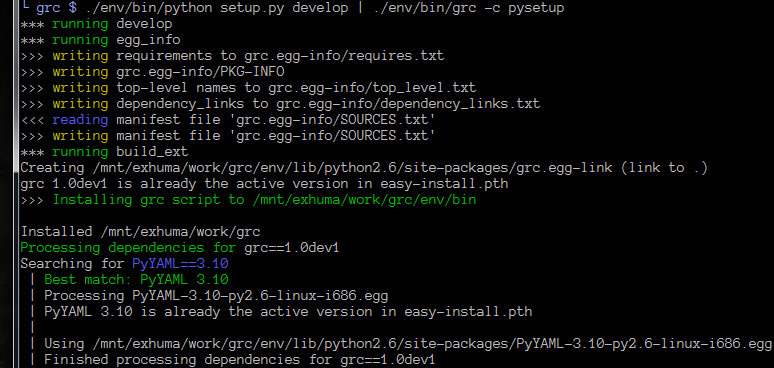
# the primary context. This section must exist!
root:
    - match: '^(running)(.*)'
      # demonstrating replacements /and/ colorizing
      replace: '*** ${t.green}\1${t.normal}\2'

    - match: '^(writing)(.*)'
      replace: '>>> ${t.yellow}\1${t.normal}\2'

    - match: '^(reading)(.*)'
      replace: '<<< ${t.blue}\1${t.normal}\2'

    - match: '^(Processing dependencies for)(.*)'
      replace: '${t.green}\1${t.normal}\2'
      # switch to the "dependencies" context
      push: dependencies

    - match: '^(Installing.*)'
      replace: '>>> ${t.green}\1${t.normal}'

# the "dependencies" context
dependencies:
    - match: '^(Finished processing dependencies for)(.*)'
      replace: '${t.green}\1${t.normal}\2'
      # Revert back to the "root" context
      pop: yes

    - match: '^(Searching for )(.*)$'
      replace: '\1${t.blue}\2${t.normal}'
      # switch to the "dependency" context
      push: dependency

# the "dependency" context
dependency:
    # Let's prepend all lines with a small indent and pipe.
    # To do this, we specify a "match-all" regex, replace the line, and
    # specify that we will continue with the next matching rule using
    # "continue"
    - match: '(.*)'
      replace: ' | \1'
      continue: yes

    # Note that after the above rule, all lines are prepended with
    # additional text. We need to include this in the regex!
    - match: '^ \| (Installing.*)'
      replace: ' | >>> ${t.green}\1${t.normal}'

    - match: '^ \| (Running.*)'
      replace: ' | ${t.green}\1${t.normal}'

    - match: '^ \| (Best match.*)'
      replace: ' | ${t.green}\1${t.normal}'

    - match: '^ \| (WARNING|warning)'
      replace: ' | ${t.yellow}\1${t.normal}'

    - match: '^ \| Installed(.*)'
      replace: ' | Installed\1\n'
      pop: yes
Config Reference
Main Level
- root
- Specifies the primary context
All other keys represent a context you pushed somewhere.
Contexts
A context is simply a list of rules
Rules
- match
Type:
stringA python regular expression. If this matches somewhere in the input line, all occurrences will be replaced with the string specified in
replace.Note
While YAML does not enforce you to enclose strings in quotes, I is strongly recommend you use single quotes for regexps to avoid trouble with string escapes (backslashes).
- replace
Type:
stringIf
continueis false (the default), this string will be emitted tostdout. Otherwise, this string will be passed to the next matching rule. Not that the following rule sees the modified string!Note
While YAML does not enforce you to enclose strings in quotes, I is recommend using single quotes if using backreferences (backslashes).
- continue
Type:
booleanIf true, don’t write the string yet to
stdout. Instead, pass it on to the next matching rule.- push
Type:
stringPushes a new context onto the stack. All following lines from
stdinwill be matched agains rules in the new context.Note
This may change in a future release to give you yet more control
- pop
Type:
booleanIf this is set to true, then return to the previous context after this rule has been processed. If in the
rootcontext, this is a no-op.Note
This may change in a future release to give you yet more control
Screenshots
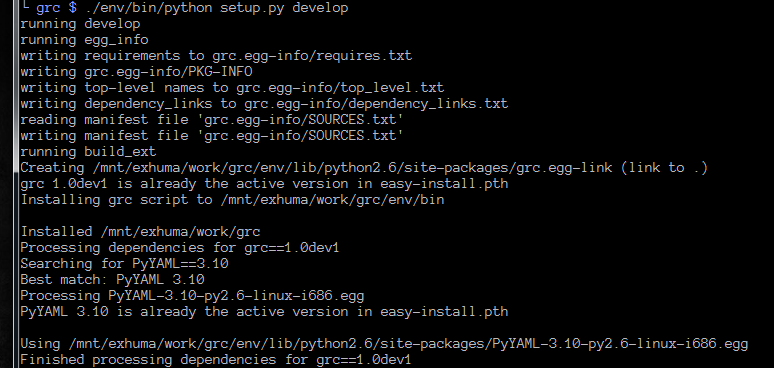
| A python setup session | |
|---|---|
| Before | After |
 |
 |
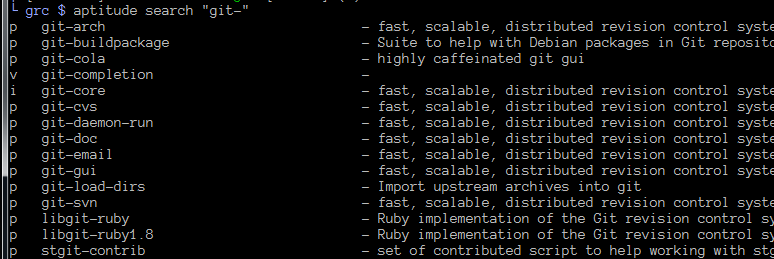
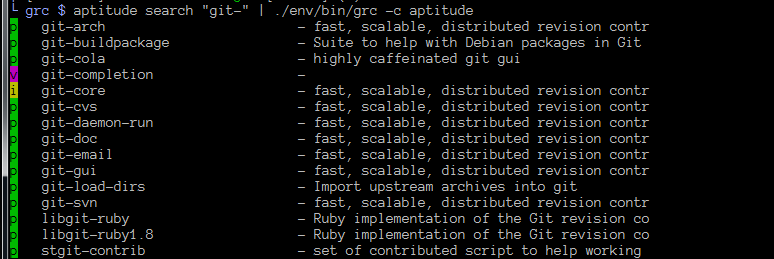
| Simple aptitude search | |
|---|---|
| Before | After |
 |
 |
| Apache access_log | |
|---|---|
| Before | After |
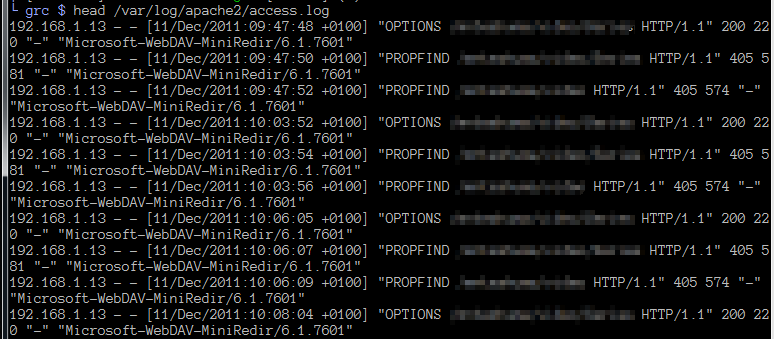 |
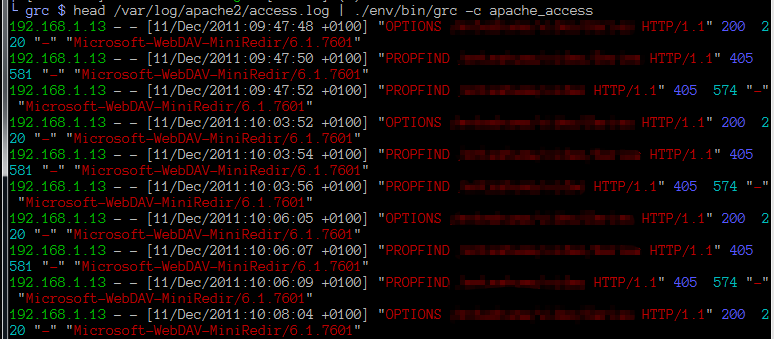 |
Footnotes
| [1] | (1, 2) grc uses pyexpect to deal with TTY pecularities. This will
however have two side-effects. First, stdout will be combined with
stderr. And second, terminal width may not be well respected. |